strange format after FunImgNormalizedSmoothedDetrendedFilteredCovremoved
Forums
Dear all,

Dear REST expert, I have a question about the statistic method for the FC analysis. We have a single case vs a group of controls(N = 12). We don't know which test is suitable for the comparison between this single case and a group of controls. Best regards Fede
Dear YAN Chao-Gan,
I saw you posted a script ( y_Smoothest) which calculates the inherent smoothness of a data set. Thanks for publishing that script, but I have a couple of question related to that:
Hi,
when i load a simple contrast map from a 2-sample t-test onto the slice viewer and xjview, they provide me with maps with different statistics (p-values not matching).
Am i missing something?
Christian
One more question, does the part "Reorienting T1 Image Interactively for XXX" require any input from the user? The Matlab display has been displaying the above message for more than an hour now. Please advise.
Thanks.
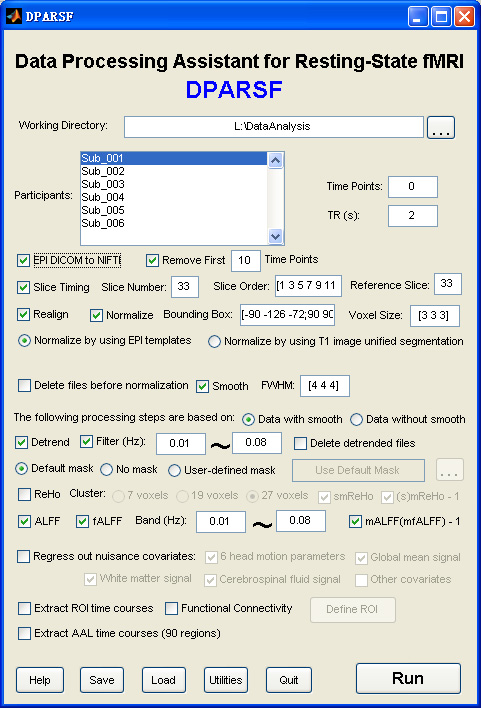 | Data Processing Assistant for Resting-State fMRI (DPARSF) is a convenient plug-in software based on SPM and REST. You just need to arrange your DICOM files, and click a few buttons to set parameters, DPARSF will then give all the preprocessed (slice timing, realign, nomalize, smooth) data, FC, ReHo, ALFF and fALFF results. DPARSF can also create a report for excluding subjects with excessive head motion and generate a set of pictures for easily checking the effect of normalization. You can use DPARSF to extract AAL or ROI time courses (or extract Gray Matter Volume of AAL regions, command line only) efficiently if you want to perform small-world analysis. This software is very easy to use, just click on buttons if you are not sure what it means, popup tips would tell you what you need to do. You also can download a MULTIMEDIA COURSE to know more about how to use this software. Add DPARSF's directory to MATLAB's path and enter "DPARSF" in the command window of MATLAB to enjoy it. The latest release is DPARSF_V1.0_100510.DOWNLOAD Multimedia Course: Data Processing of Resting-State fMRI |
New features of DPARSF_V1.0_100510:
1. Added a right-click menu to delete all the participants' ID.
2. Fixed a bug in converting DICOM files to NIfTI in Windows 7, thanks to Prof. Chris Rorden's new dcm2nii.
3. Now will detect if co* T1 image (T1 image which is reoriented to the nearest orthogonal direction to 'canonical space' and removed excess air surrounding the individual as well as parts of the neck below the cerebellum) exists before normalization by using T1 image unified segmentation. T1 image without 'co' is also allowed in the analysis now.
New features of DPARSF_V1.0_100420:
1. After extracting ROI time courses, not just functional connectivity will be calculated, but also transform the r values to z values by Fisher's z transformation.
2. Fixed a bug in generating pictures for checking normalization when the bounding box is not [-90 -126 -72;90 90 108].